HTTP and SOCKS5 proxies are different client-to-proxy protocols, not different IP source types. A residential or ISP product may expose either protocol if the plan supports it. For ordinary web requests, both can reach an HTTPS site. The useful choice depends on your application, name-resolution needs, and whether you need traffic beyond standard web requests—not on an unmeasured claim that one protocol is always faster or more anonymous.
This guide compares the protocols at the point where your application connects to the proxy. It does not rank provider networks or promise that a website will accept a request merely because it used one protocol.
What actually changes on the wire?
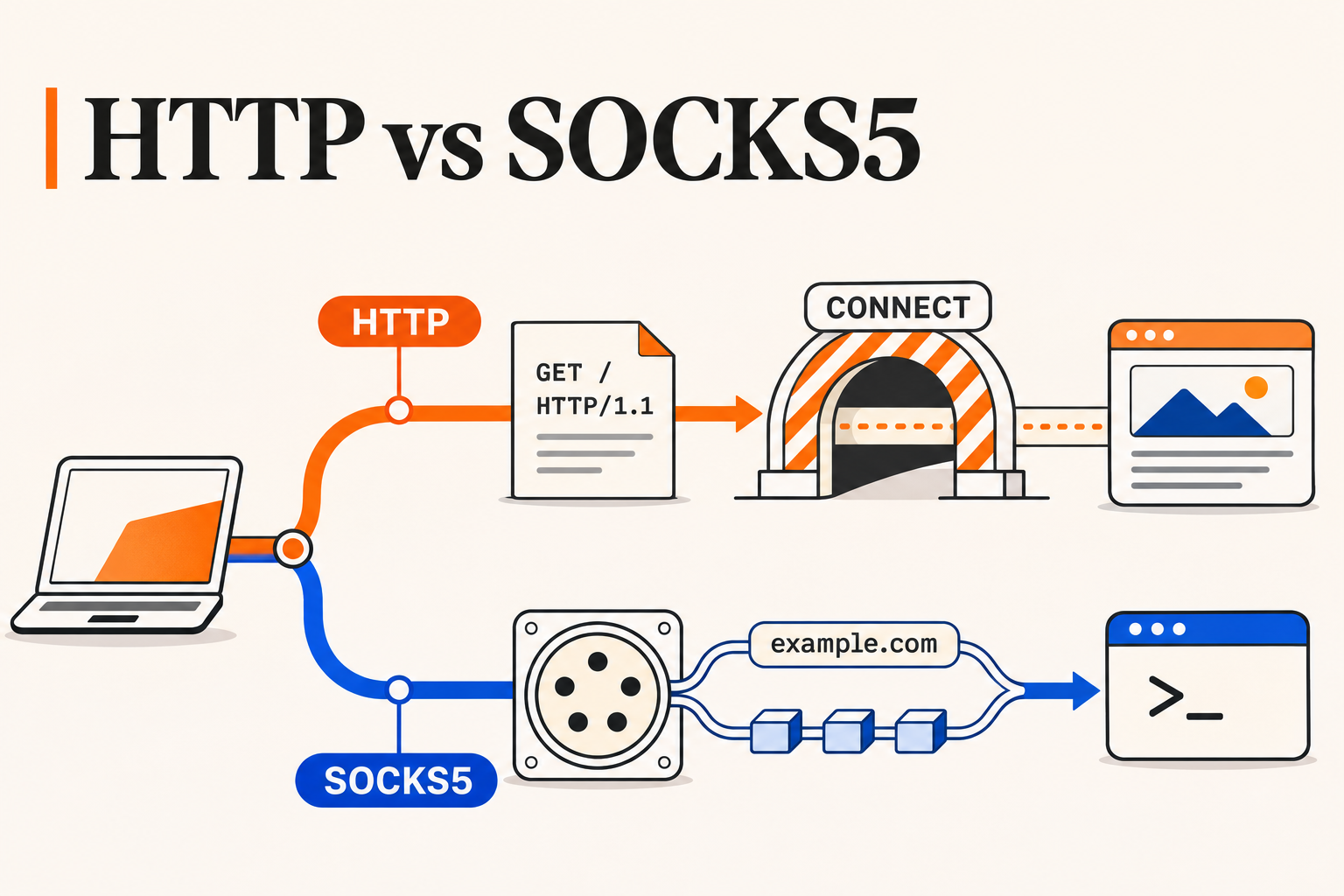
An HTTP proxy understands HTTP requests. For an HTTPS destination, the client generally asks the proxy to establish a tunnel using HTTP `CONNECT`; once the tunnel is established, the client negotiates TLS with the destination through it. A SOCKS5 proxy starts with a SOCKS negotiation and can forward a TCP connection without interpreting HTTP methods. The SOCKS5 standard also defines UDP association, but the application, client library and purchased endpoint must all implement it for UDP traffic to work.
| Decision factor | HTTP proxy | SOCKS5 proxy |
|---|---|---|
| Primary mechanism | HTTP request forwarding or CONNECT tunnel. | SOCKS5 negotiation followed by TCP connection forwarding; UDP is optional in practice. |
| Typical web clients | Widely supported by browsers, cURL and HTTP libraries. | Supported by many clients, but library support and authentication details vary. |
| HTTPS website | Normally uses CONNECT, then end-to-end TLS to the destination. | Forwards the TCP connection used for TLS to the destination. |
| Domain lookup | CONNECT can carry a hostname; inspect the actual client behavior. | Client-dependent: `socks5` may resolve locally; `socks5h` requests proxy-side resolution in cURL and Requests. |
| Authentication | HTTP proxy authentication can use 407 and Proxy-Authorization. | Negotiates a SOCKS method such as username/password; it does not use HTTP 407 for the SOCKS handshake. |
| Non-HTTP traffic | CONNECT may tunnel permitted TCP destinations, subject to proxy policy. | Designed for TCP and defines UDP association, subject to product and client support. |
DNS location is a client setting, not a marketing label
For SOCKS5, the distinction between `socks5://` and `socks5h://` is important in cURL and Python Requests. Their documentation says `socks5` resolves the destination hostname on the client, while `socks5h` sends the hostname for proxy-side resolution. That can matter when the client network cannot resolve a target, or when you need to avoid local DNS resolution. It does not by itself guarantee that every application request or browser DNS path stays inside the proxy; test the actual client.
For HTTP CONNECT, a client can send the target hostname in the CONNECT authority and let the proxy establish the connection. Do not generalize that all HTTP proxy modes resolve identically: behavior can vary with client configuration, cached DNS, explicit IP addresses and redirects. Check a real request rather than inferring DNS location from the protocol name.
Authentication and encryption are separate questions
A 407 response is part of HTTP proxy authentication. SOCKS5 negotiates an authentication method before relaying traffic; the optional username/password method is specified separately in RFC 1929. A proxy username and password do not turn an unencrypted client-to-proxy connection into an encrypted one. When accessing an HTTPS destination, TLS protects the application connection to that destination through a normal tunnel, but the transport to the proxy and the provider's handling of metadata are separate considerations. Use a provider-supported secure proxy transport if your threat model requires it; do not disable certificate verification to make a connection appear successful.
Test both with the same permitted task
If your plan exposes both protocols, use the endpoint and port designated for each. The following placeholders are not real credentials. Compare the observed exit IP, target response, content validity, session behavior and total cost under the same region, time window and concurrency. Do not paste real passwords into shared shell histories or logs.
# Use the HTTP endpoint assigned to your plan
curl --proxy 'http://HTTP_HOST:HTTP_PORT' --proxy-user 'USER:PASS' \
  --connect-timeout 10 --max-time 30 'https://api.ipify.org?format=json'

# Use a separately confirmed SOCKS5 endpoint, if your plan provides one
curl --proxy 'socks5h://SOCKS_HOST:SOCKS_PORT' --proxy-user 'USER:PASS' \
  --connect-timeout 10 --max-time 30 'https://api.ipify.org?format=json'
The two commands only prove that a request can exit through each configured endpoint. A useful pilot then tests the actual authorized target and records valid-result rate, P95 end-to-end time, failure type and billed bytes. The protocol alone does not determine speed: routing, exit IP, target behavior, connection reuse and client settings can dominate the result.
Choose based on the application
| Workload | Usually start with | Verify before deployment |
|---|---|---|
| Python Requests or a browser making HTTPS pages | HTTP proxy; it has a direct configuration path in common web clients. | CONNECT support, authentication, target content and TLS validation. |
| Generic TCP tool with native SOCKS support | SOCKS5, if the tool and plan both support it. | Authentication method, hostname handling and target protocol. |
| Application that needs UDP | SOCKS5 only if client and endpoint explicitly support UDP association. | Actual UDP forwarding; a SOCKS5 label alone is insufficient. |
| Problem is only location or IP reputation | Either protocol may work; select exit type and region first. | Observed exit, target results and session policy. |
How this applies to IP Fist
IP Fist's documentation states that its proxies can be configured in applications using HTTP or SOCKS5. Use your dashboard to confirm which protocol endpoint, port and authentication method apply to your exact product and plan. Its public quick test shows an HTTP residential endpoint; do not assume that replacing `http://` with `socks5h://` on that same host and port is supported. First test the assigned endpoint, then the real workload.
Frequently asked questions
Is SOCKS5 always faster than HTTP?
No universal result follows from the protocol names. Measure both on the same target, region and client settings, including useful content and tail latency. Provider network and workload often matter more.
Does SOCKS5 automatically keep DNS off my machine?
No. In cURL and Requests, `socks5://` can perform local DNS resolution; `socks5h://` requests proxy-side hostname resolution. Check the behavior of your actual application.
Can an HTTP proxy reach an HTTPS website?
Yes, if the endpoint permits CONNECT to the destination port. The client establishes a tunnel and then performs TLS to the website. An HTTP proxy address beginning with `http://` describes the connection to the proxy, not the security of the HTTPS destination.
Sources and verification scope
Protocol details follow RFC 9110's CONNECT semantics, RFC 1928 SOCKS5, RFC 1929 authentication, the cURL manual and the Requests proxy documentation. IP Fist product statements follow its public docs. This is a protocol comparison, not a live head-to-head benchmark of IP Fist endpoints.